KFU Cybersecurity Club
Write-up for the CyberXbytes & KFU Cybersecurity Club CTF Challenge Competition held on November 26, 2025.
Reverse Engineer
XORcist
Description: Think you got what it takes? nothing but a hardcore reversing.
1
2
3
4
5
6
7
8
9
─$ file chal-1
chal-1: ELF 64-bit LSB pie executable, x86-64, version 1 (SYSV), dynamically linked, interpreter /lib64/ld-linux-x86-64.so.2, BuildID[sha1]=aa46185dcf8f115ba2bed8fa3e4e29f51cb3ec17, for GNU/Linux 3.2.0, not stripped

/chal-1
Usage: ./chal-1 <pass>

./chal-1 test
^dxo_dixefO.k.on,szB[hsBRoBI-oihox`
loaded the binary into Ghidra, and this is the main function:
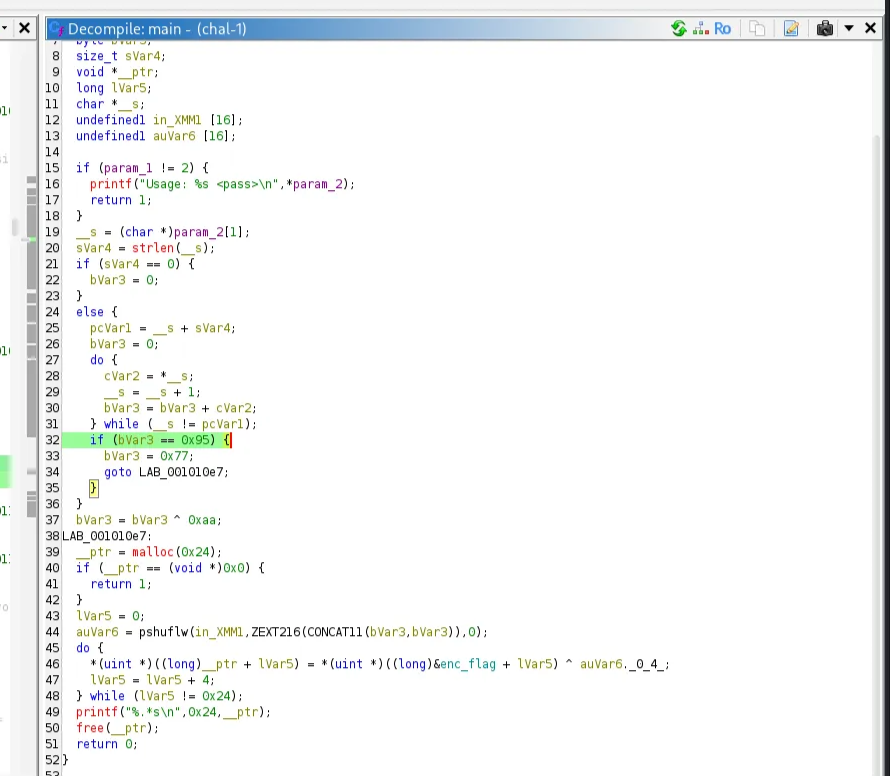
It takes the user input, then calculates the sum of the ASCII values. If true, it will XOR the encrypted flag with the value 0x77(119d), otherwise it will XOR it with 0xaa (170d). ASCII Table:
- d → 100
- 1 → 49
sum = 149
1
2
─$ ./chal-1 d1
CyberBytex{R3v3rs1ng_Fun_Or_T0rture}
ELF Binary
Description: You have an ELF binary, and your task is to conduct a basic analysis to extract the flag to win.
1
2
3
4
5
6
 $ file Vault
Vault: ELF 64-bit LSB pie executable, x86-64, version 1 (SYSV), dynamically linked, interpreter /lib64/ld-linux-x86-64.so.2, BuildID[sha1]=a686b990775b6c1d2ef1a942922c3cdf0ddff35e, for GNU/Linux 3.2.0, not stripped

─$ ./Vault
Password: test
Incorrect password.
Loaded the binary into Ghidra, and here is the main function, the password is compared in the function checkpassword
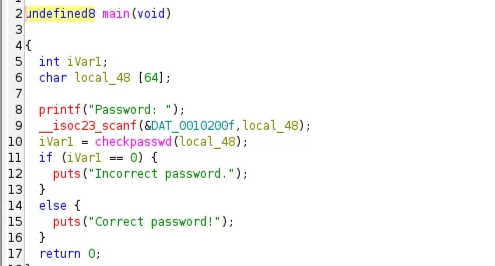
The correct password is saved in the local_98 array
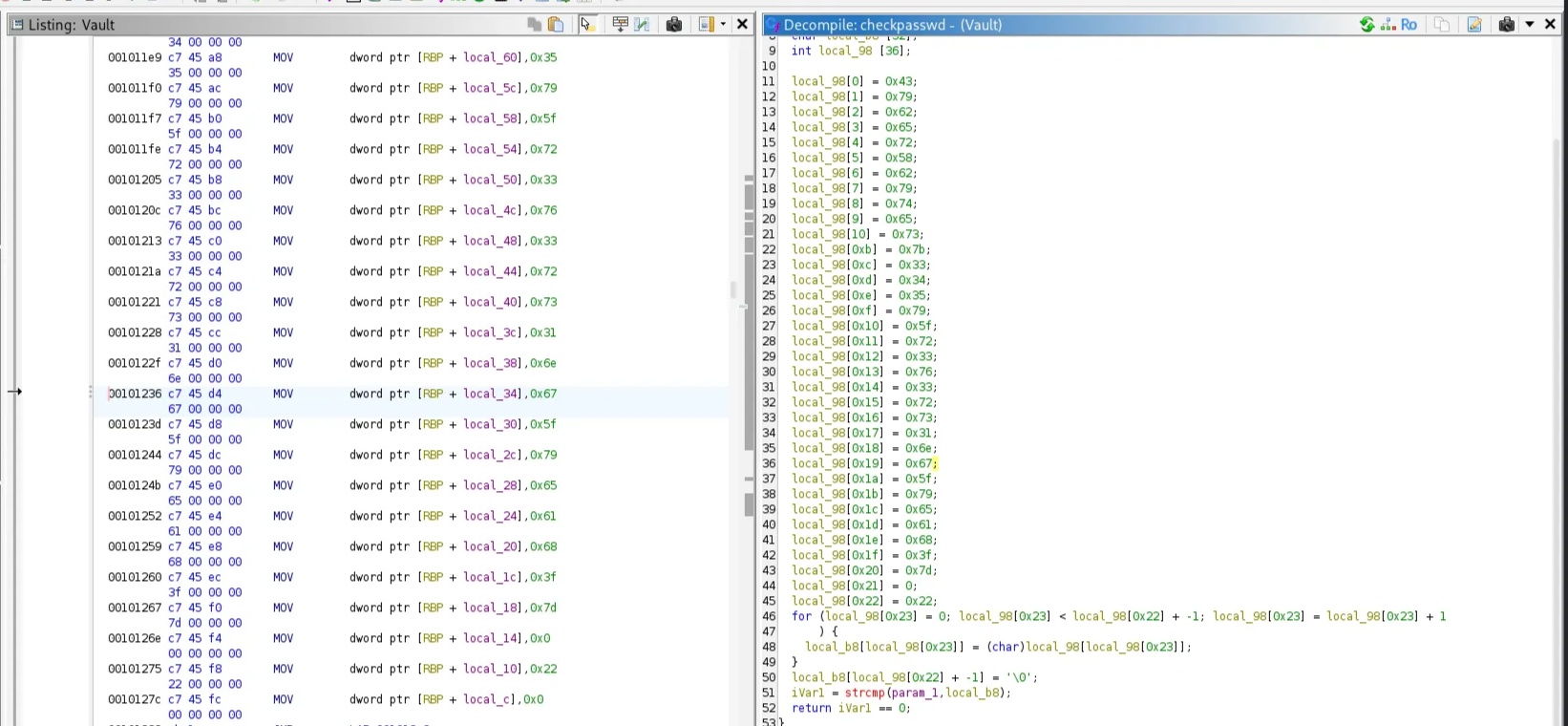
Extracted the hex values in this array and converted them from hex
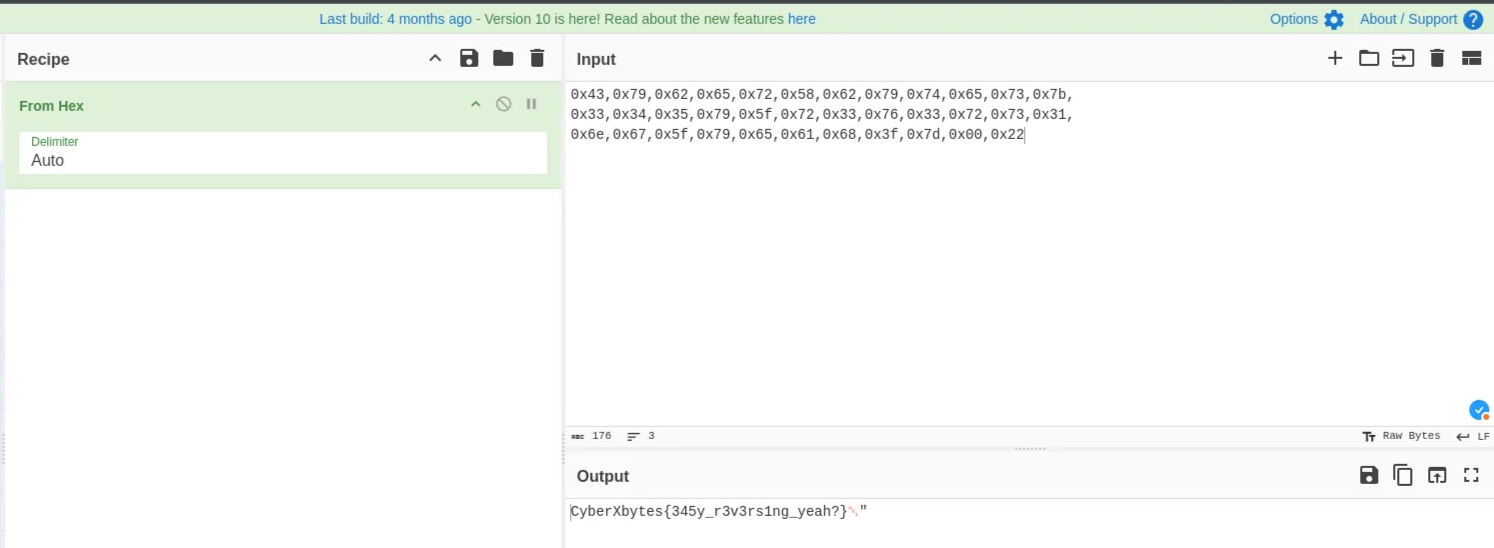
1
2
3
 ./Vault
Password: CyberXbytes{345y_r3v3rs1ng_yeah?}
Correct password!
Forensics
SRT
Description: It is said that there is a secret hidden inside the engine. Can you uncover it?
1
2
3
4
5
6
7
8
9
10
11
12
13
14
15
16
17
18
19
20
21
22
23
24
25
26
27
28
29
30
31
32
33
34
35
36
37
38
39
40
41
42
43
44
45
46
47
48
49
50
51
52
53
54
55
56
57
58
59
60
61
62
63
64
65
66
67
68
69
70
71
72
73
74
75
76
$ exiftool Title-Edit.mp4
ExifTool Version Number         : 12.57
File Name                       : Title-Edit.mp4
Directory                       : .
File Size                       : 41 MB
File Modification Date/Time     : 2025:06:12 01:01:18+03:00
File Access Date/Time           : 2025:11:26 17:03:29+03:00
File Inode Change Date/Time     : 2025:11:26 17:03:10+03:00
File Permissions                : -rw-rw-r--
File Type                       : MP4
File Type Extension             : mp4
MIME Type                       : video/mp4
Major Brand                     : MP4 Base Media v1 [IS0 14496-12:2003]
Minor Version                   : 0.2.0
Compatible Brands               : isom, iso2, avc1, mp41
Media Data Size                 : 40960694
Media Data Offset               : 48
Movie Header Version            : 0
Create Date                     : 0000:00:00 00:00:00
Modify Date                     : 0000:00:00 00:00:00
Time Scale                      : 1000
Duration                        : 20.00 s
Preferred Rate                  : 1
Preferred Volume                : 100.00%
Preview Time                    : 0 s
Preview Duration                : 0 s
Poster Time                     : 0 s
Selection Time                  : 0 s
Selection Duration              : 0 s
Current Time                    : 0 s
Next Track ID                   : 4
Track Header Version            : 0
Track Create Date               : 0000:00:00 00:00:00
Track Modify Date               : 0000:00:00 00:00:00
Track ID                        : 1
Track Duration                  : 16.90 s
Track Layer                     : 0
Track Volume                    : 0.00%
Image Width                     : 1920
Image Height                    : 1080
Graphics Mode                   : srcCopy
Op Color                        : 0 0 0
Compressor ID                   : avc1
Source Image Width              : 1920
Source Image Height             : 1080
X Resolution                    : 72
Y Resolution                    : 72
Bit Depth                       : 24
Buffer Size                     : 0
Max Bitrate                     : 19196766
Average Bitrate                 : 19196766
Video Frame Rate                : 30
Balance                         : 0
Audio Format                    : mp4a
Audio Channels                  : 2
Audio Bits Per Sample           : 16
Audio Sample Rate               : 48000
Matrix Structure                : 1 0 0 0 1 0 0 0 1
Media Header Version            : 0
Media Create Date               : 0000:00:00 00:00:00
Media Modify Date               : 0000:00:00 00:00:00
Media Time Scale                : 1000000
Media Duration                  : 20.00 s
Media Language Code             : und
Handler Description             : SubtitleHandler
Other Format                    : tx3g
Font Table                      : Arial
Warning                         : [minor] The ExtractEmbedded option may find more tags in the media data
Handler Type                    : Metadata
Handler Vendor ID               : Apple
Encoder                         : Lavf61.7.100
Comment                         : Create videos with https://clipchamp.com/en/video-editor - free online video editor, video compressor, video converter.
Image Size                      : 1920x1080
Megapixels                      : 2.1
Avg Bitrate                     : 16.4 Mbps
Rotation                        : 0
The video contains Base64 chunks, I used ffmpeg to extract them, but you can use strings command. An .srt extension stands for SubRip Subtitle file, a plain text file format used to store video subtitles and captions
1
2
3
4
5
6
7
8
9
10
11
12
13
14
15
16
17
18
19
ffmpeg -i Title-Edit.mp4 -map 0:2 -c:s srt output.srt

cat output.srt
1
00:00:01,000 --> 00:00:05,000
UEsDBBQACQBjAK6+y1poo6pWlQAAAIMCAAAIAAsAZmxhZy50eHQBmQcAAQBBRQMIAPTVvxO4Rh06SqoGxkUNsA7OghQdLJVVfmLoRB9lp

2
00:00:06,000 --> 00:00:10,000
52RvhkQZiY6eleJ8Q7upiaxOnl9eMeFFRAiZsF338lzR1i6sQ9H8WBxaBEjws5iP6dAMZFUzNCCVp6vnF0b4U9qtQvK47PkY6gEd3syKZpfBSyo3cDgypzTj+MY3ZhAjiEdnq39Gm/6GYRcQ5uRxNb2NWoKYnDcUEsHCGijqlaVAAAAgwIAAFBLAQIfABQACQBjAK6

3
00:00:10,000 --> 00:00:15,000
+y1poo6pWlQAAAIMCAAAIAC8AAAAAAAAAIAAAAAAAAABmbGFnLnR4dAoAIAAAAAAAAQAYABwao+IS29sBX9bhARTb2wH4QxfSEtvbAQGZBwABAEFFAwgAUEsFBgAAAAABAAEAZQAAANYAAAAAAA==

4
00:00:16,000 --> 00:00:20,000
c3J0X3Bhc3N3b3Jk
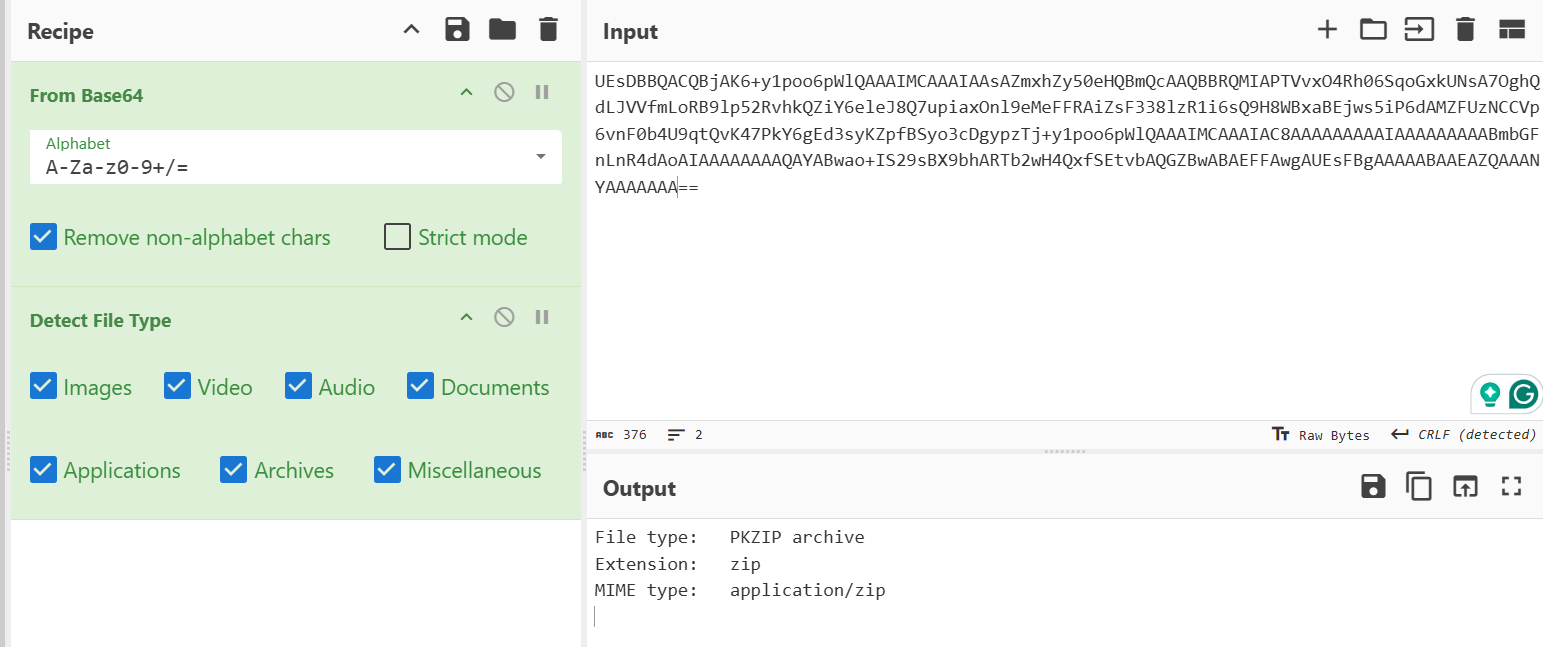
So the base64 decoded is a zip file and the last base64 encoded is the zip password
1
2
$ echo "c3J0X3Bhc3N3b3Jk" | base64 -d
srt_password
Rebuild the base64 to zip file
1
echo "UEsDBBQACQBjAK6+y1poo6pWlQAAAIMCAAAIAAsAZmxhZy50eHQBmQcAAQBBRQMIAPTVvxO4Rh06SqoGxkUNsA7OghQdLJVVfmLoRB9lp52RvhkQZiY6eleJ8Q7upiaxOnl9eMeFFRAiZsF338lzR1i6sQ9H8WBxaBEjws5iP6dAMZFUzNCCVp6vnF0b4U9qtQvK47PkY6gEd3syKZpfBSyo3cDgypzTj+y1poo6pWlQAAAIMCAAAIAC8AAAAAAAAAIAAAAAAAAABmbGFnLnR4dAoAIAAAAAAAAQAYABwao+IS29sBX9bhARTb2wH4QxfSEtvbAQGZBwABAEFFAwgAUEsFBgAAAAABAAEAZQAAANYAAAAAAA==" | base64 -d > decoded.zip
1
2
file decoded.zip
decoded.zip: Zip archive data, made by v3.1, extract using at least v2.0, last modified Jun 11 2025 23:53:28, uncompressed size 643, method=AES Encrypted
unzip with the password we found “srt_password ”
1
7z x decoded.zip
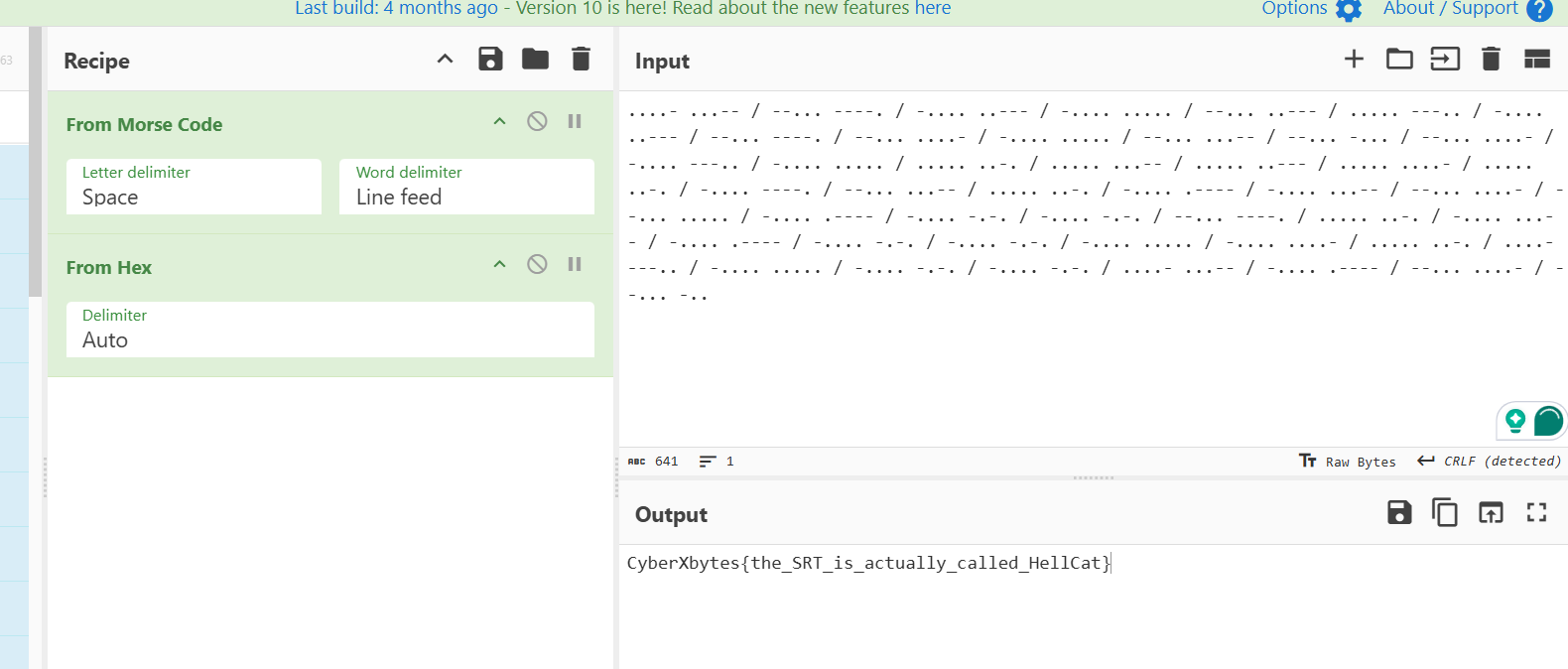
The extracted file was a the flag coded in morse
1
....- ...-- / --... ----. / -.... ..--- / -.... ..... / --... ..--- / ..... ---.. / -.... ..--- / --... ----. / --... ....- / -.... ..... / --... ...-- / --... -... / --... ....- / -.... ---.. / -.... ..... / ..... ..-. / ..... ...-- / ..... ..--- / ..... ....- / ..... ..-. / -.... ----. / --... ...-- / ..... ..-. / -.... .---- / -.... ...-- / --... ....- / --... ..... / -.... .---- / -.... -.-. / -.... -.-. / --... ----. / ..... ..-. / -.... ...-- / -.... .---- / -.... -.-. / -.... -.-. / -.... ..... / -.... ....- / ..... ..-. / ....- ---.. / -.... ..... / -.... -.-. / -.... -.-. / ....- ...-- / -.... .---- / --... ....- / --... -..
First from Morse code, then from hex
GIF
Description: Can you find the flag?
The provided GIF contained multiple barcodes that contained base64 encoding. So I used this Python code to capture each frame and extract the data from the barcode
1
2
3
4
5
6
7
8
9
10
11
12
from PIL import Image, ImageSequence
from pyzbar.pyzbar import decode

# Open GIF
gif = Image.open("CyberXbytes.gif")

# Iterate through frames if animated
for frame in ImageSequence.Iterator(gif):
    barcodes = decode(frame)
    for barcode in barcodes:
        print("Type:", barcode.type)
        print("Data:", barcode.data.decode("utf-8"))
From the extracted base64 encoding, one of them is the real flag.
1
2
 echo "Q3liZXJYYnl0ZXN7aGl3bDkyOTNpd2JmOTI0aGVvOWRqfQ==" | base64 -d
CyberXbytes{hiwl9293iwbf924heo9dj}
Scan Me
Description: My friend manipulated the photo. Please fix the photo and see the flag.
1
2
3
4
5
6
7
 $ file HereFlag.png
HereFlag.png: data

─$ xxd HereFlag.png | head
00000000: 8950 4d47 0d0a 1a0a 0000 000d 5244 4849  .PMG........RDHI
00000010: 0000 014a 0000 014a 0100 0000 0053 522b  ...J...J.....SR+
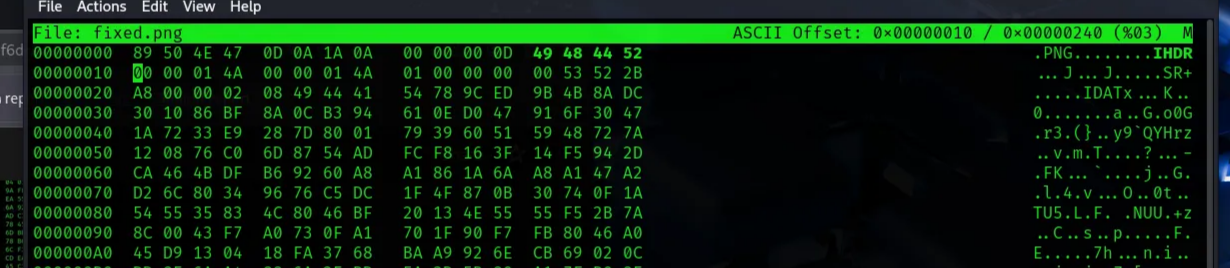
The header signature is wrong, PMG instead of PNG. Fixed this with hexeditor. Refer to this article for more info. The PNG header is :
1
8950 4e47 0d0a 1a0a
We just need to replace the D hex with E and save it.
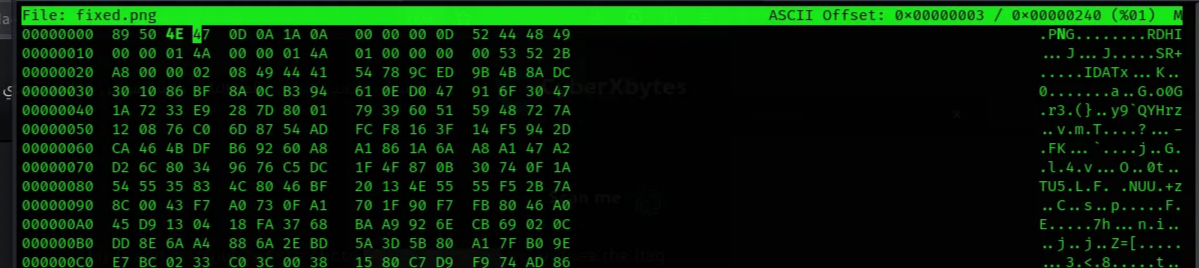
Then I checked the fixed file metadata, which gave me a warning “PNG image did not start with IHDR”
1
2
3
4
5
6
7
8
9
10
11
12
13
14
15
16
17
xxd fixed.png  | head
00000000: 8950 4e47 0d0a 1a0a 0000 000d 5244 4849  .PNG........RDHI

exiftool fixed.png
ExifTool Version Number         : 12.57
File Name                       : fixed.png
Directory                       : .
File Size                       : 577 bytes
File Modification Date/Time     : 2025:09:12 12:29:27+03:00
File Access Date/Time           : 2025:09:12 12:29:38+03:00
File Inode Change Date/Time     : 2025:09:12 12:29:27+03:00
File Permissions                : -rw-rw-r--
File Type                       : PNG
File Type Extension             : png
MIME Type                       : image/png
Warning                         : PNG image did not start with IHDR
The Chunk type IHDR also needs to be fixed. Open the hex editor and fix the chunk type to:
1
4948 4452
1
2
xxd fixed.png
00000000: 8950 4e47 0d0a 1a0a 0000 000d 4948 4452  .PNG........IHDR
Fixed! and we can now open the image and scan the barcode here to get the flag

Crypto
ROT13
Description: Cryptography can be easy, do you know what ROT13 is?
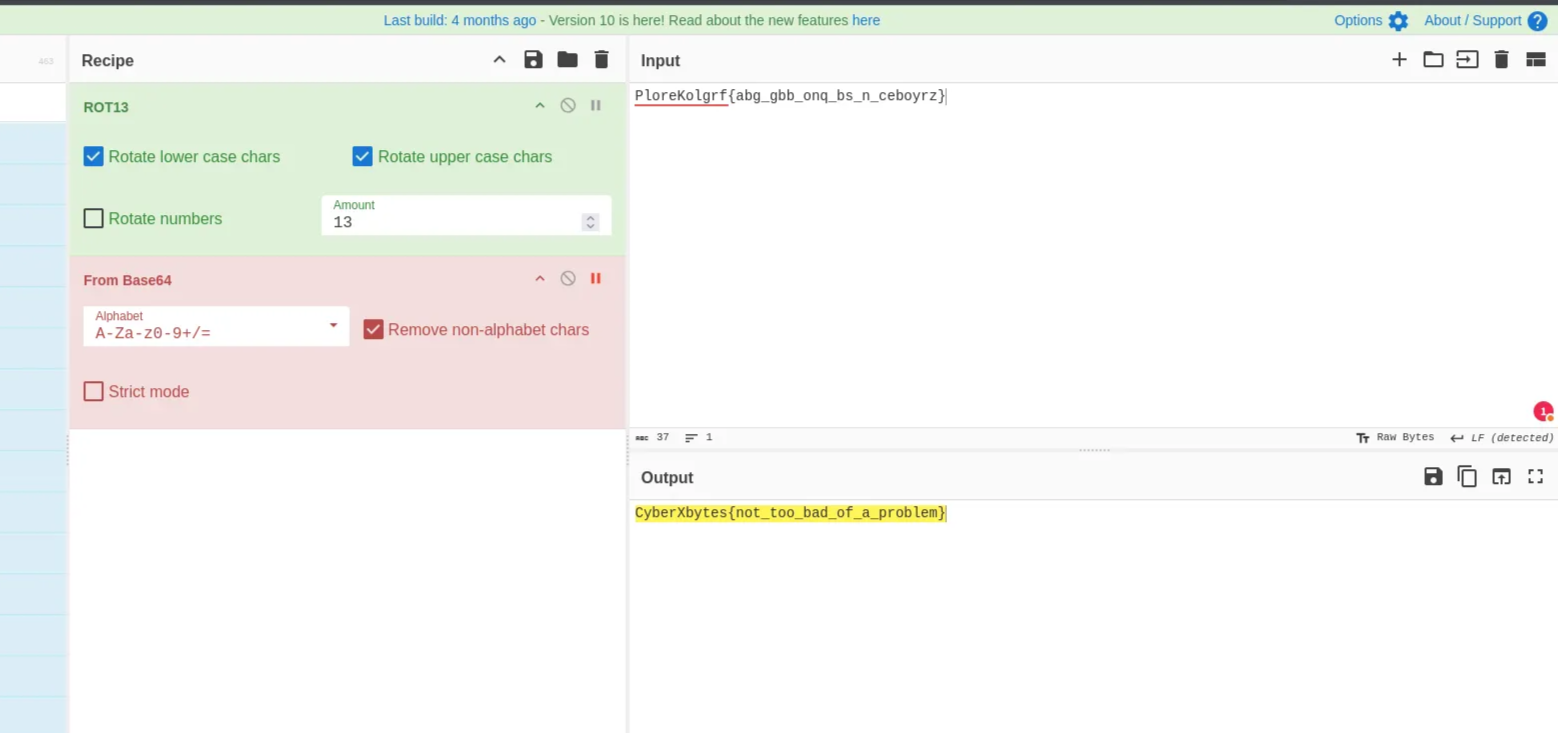
We just need to decode the text with ROT13
1
PloreKolgrf{abg_gbb_onq_bs_n_ceboyrz}
Dvorak
Description: where familiar keys live in unfamiliar places — fast, odd, and perfectly confusing.
1
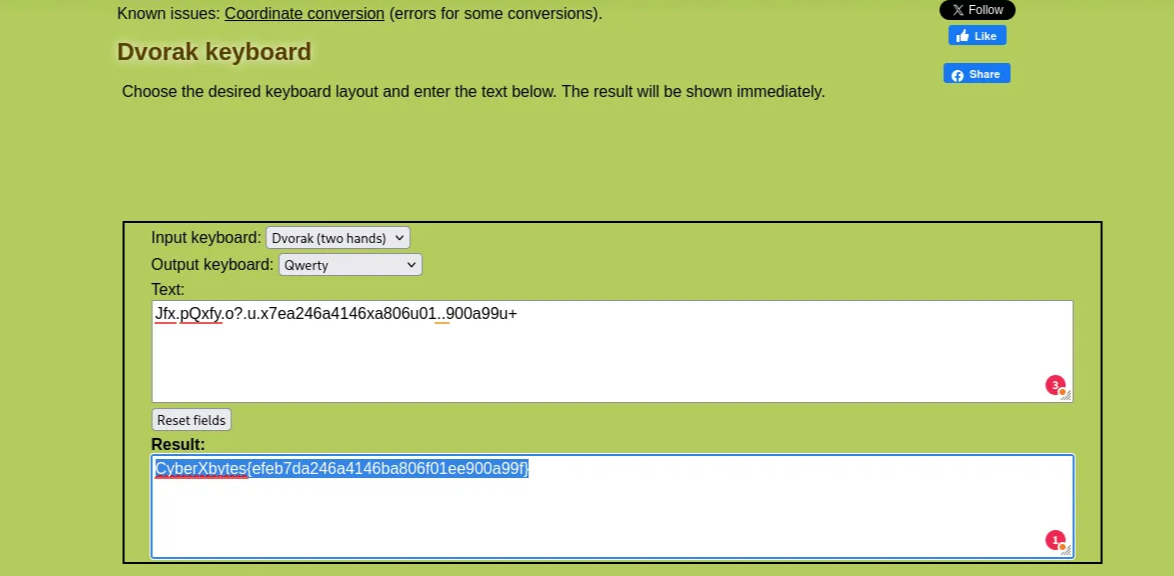
Jfx.pQxfy.o?.u.x7ea246a4146xa806u01..900a99u+
The challenge hint at the Dvorak layout, where the familiar keys on the keyboard are in different places. It places the most frequently used letters on the home row to minimize finger movement.
Used this website to return the final result:
- Input keyboard: Dvorak (two hands)
- Output keyboard: Qwerty
CipherStream
Description: A storm of ciphers, noise, and chaos stands between you and the hidden flag. Shuffled fragments, cryptic layers, and deceptive patterns await. Can you weather the CipherStorm and emerge victorious?
1
U21acGJIbEZRQ05DUMMYNOISEPSVNFMTIzRkFhV1EXTRALAYERpoYkhwN0VYVFJBISFJeVFsZERCNU0xUkFORE9NREFUQTlLSmlvb01IUjNNT1JFVEVYVGN6TmxYMHgxYW5sbWR6Y3hNSFZmUVRObFlYMD0=
The challenge goal is to remove the noise from the base64 encoded character. The identified noise:
DUMMYNOISEEXTRALAYER
It resulted in another base64 character
1
SmZpbHlFQCNOISE123FAaWZhbHp7EXTRA!!IyQldDB5M1RANDOMDATA9KJiooMHR3MORETEXTczNlX0x1anlmdzcxMHVfQTNlYX0=
Identify noise:
EXTRA!!NOISE123RANDOMDATAMORETEXT
result in another noise data
1
JfilyE@!@ifalz{#$%t0y3_J&*(0tws3e_Lujyfw710u_A3ea}
remove these symbols @!@#$%&*(
1
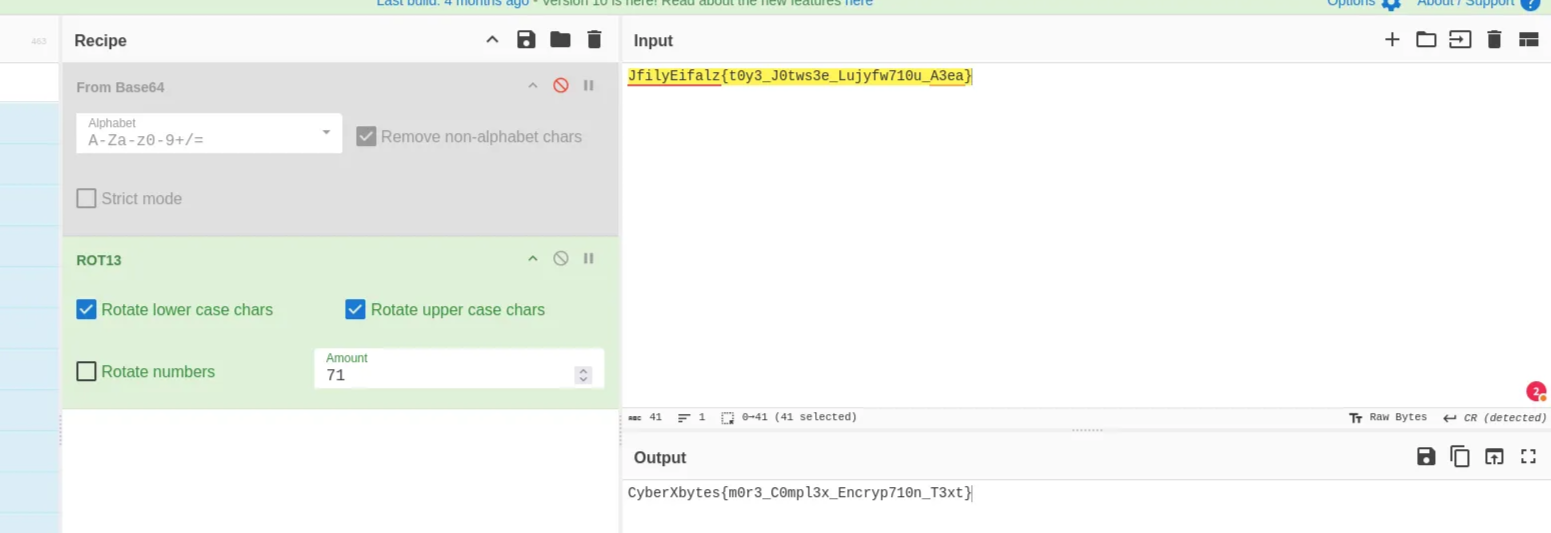
JfilyEifalz{t0y3_J0tws3e_Lujyfw710u_A3ea}
Now keep rotating the character till you get the flag
The correct flag:
1
CyberXbytes{m0r3_C0mpl3x_Encryp710n_T3xt}
WEB
Mystery Quest
Description: Deep within the code lies a challenge waiting for those who can untangle the digital web. Solving it requires focus and precision, as tracing the scattered parts of the message is key. Do you have what it takes to uncover the hidden truth? Prove your skills and navigate this challenge to reach the carefully concealed ending.
We are given a website that generates random decoy flags
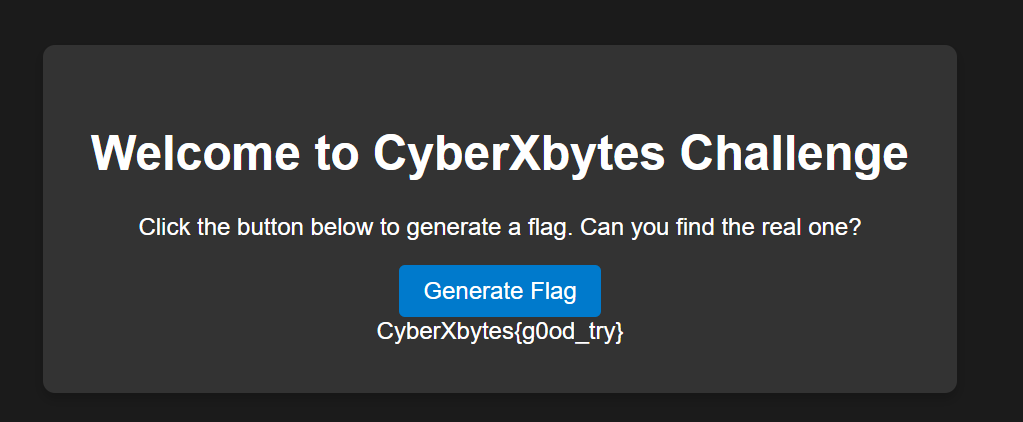
This is the source code:
1
2
3
4
5
6
7
8
9
10
11
12
13
14
15
16
17
18
19
<!DOCTYPE html>
<html lang="en">
<head>
    <meta charset="UTF-8">
    <meta name="viewport" content="width=device-width, initial-scale=1.0">
    <title>CyberXbytes </title>
    <link rel="stylesheet" href="style.css">
</head>
<body>
    <div class="container">
        <h1>Welcome to CyberXbytes Challenge</h1>
        <p>Click the button below to generate a flag. Can you find the real one?</p>
        <button onclick="generateFlag()">Generate Flag</button>
        <div id="flag-output"></div>
    </div>
    <script src="script.js"></script>
    <script src="flag_partials.js"></script>
</body>
</html>
The challenge goal is to collect the scattered parts of the flag from the website’s source code. and searched inside these files:
flag_partials.js
1
console.log("Ti0n$_");
script.js
1
2
3
4
5
6
7
8
9
10
11
12
13
14
15
16
17
18
19
20
21
22
23
24
25
26
27
28
29
function generateFlag() {
    const randomFlags = [
        "CyberXbytes{tr1cked_y0u_1}",
        "CyberXbytes{n0t_qu1te_1t}",
        "CyberXbytes{g00d_luck_next_time}",
        "CyberXbytes{wR0ng_fl4g}",
        "CyberXbytes{trY_a9ain}",
        "CyberXbytes{keEp_L00kinG}",
        "CyberXbytes{Almost_th3rE}",
        "CyberXbytes{y0u_m1ssed_1t}",
        "CyberXbytes{just_a_b1t_m0re}",
        "CyberXbytes{another_red_herr1ng}",
        "CyberXbytes{bett3r_luck_next}",
        "CyberXbytes{missed_aga1n}",
        "CyberXbytes{st1ll_wrong}",
        "CyberXbytes{nice_try_th0ugh}",
        "CyberXbytes{hmm_1nteresting}",
        "CyberXbytes{b4d_gu3ss}",
        "CyberXbytes{g0od_try}",
        "CyberXbytes{not_th3_right_one}",
        "CyberXbytes{try0_again}",
        "CyberXbytes{anoth3r_m1stake}"
    ];

    const randomIndex = Math.floor(Math.random() * randomFlags.length);
    document.getElementById("flag-output").innerText = randomFlags[randomIndex];
}

console.log("yOU _wON}");
and lastly style.css
1
2
3
4
5
flag-css::before {
    content: "CyberXbytes{c0NGrATu";
    visibility: hidden;
    position: absolute;
}
All pieces combined:
1
CyberXbytes{c0NGrATuTi0n$_yOU_wON}
Quest
Description: Test your skills in this dynamic web application challenge. Analyze, adapt, and conquer!
1
2
3
$ curl  http://185.185.82.29:5001/
<h1>Access Denied</h1>
<p>Sorry, your browser is not supported. Please use CTF_Junior.</p>
We must change the user-agent to CTF_Junior
1
2
3
4
$ curl -A "CTF_Junior"  http://185.185.82.29:5001/

<h1>Access Denied</h1>
<p>We apologize, but the site will be available to the public on January 1st, 2030.</p>
Change the Date header to January 1st, 2030 to view the content
1
2
3
4
5
6
$ curl -A "CTF_Junior" -H "Date: Tue, 01 Jan 2030 00:00:00 GMT"  http://185.185.82.29:5001/

 <h1>Congratulations!</h1>
<p>You found the flag:</p>
<p><strong>CyberXbytes{W38_ctf_Ch@lLEnG3_soLVEd}</strong></p>
Secret Vault
Description: Three parts make the key. Only one combination opens the vault.
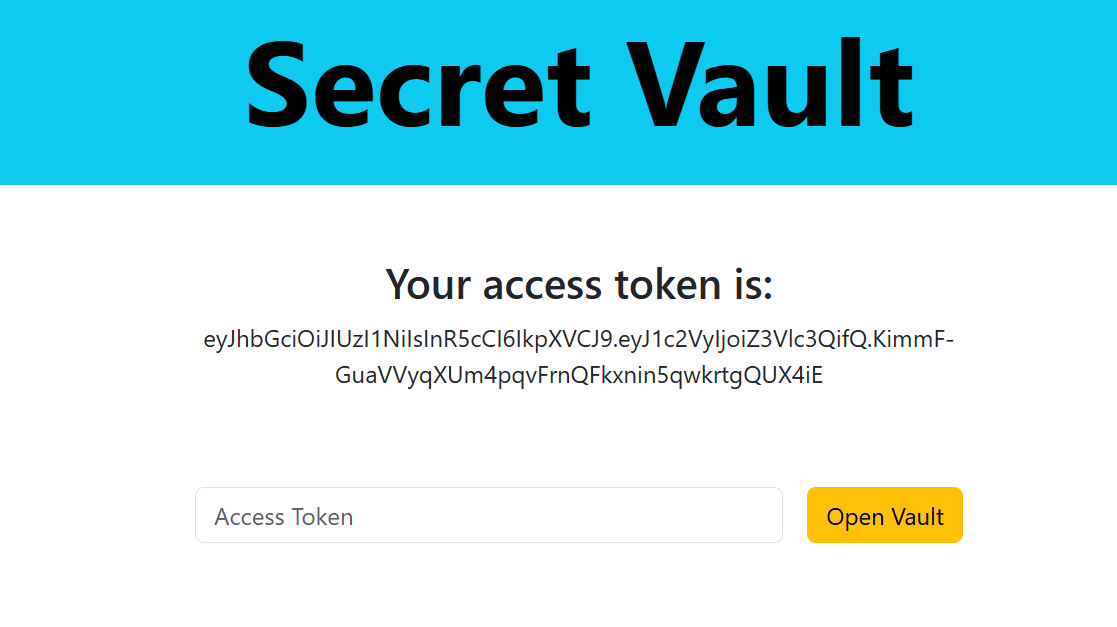
Token:
1
eyJhbGciOiJIUzI1NiIsInR5cCI6IkpXVCJ9.eyJ1c2VyIjoiZ3Vlc3QifQ.KimmF-GuaVVyqXUm4pqvFrnQFkxnin5qwkrtgQUX4iE
JSON Web Tokens consist of three parts separated by dots (.), which are:
- Header →
{"alg":"HS256","typ":"JWT"} - Payload →
{"user":"guest"} - Signature → “
”
The signature is calculated by the encoded header, the encoded payload, a secret, the algorithm specified in the header, and signing that.
Crack the secret with john, then use jwt.io website to generate a new signature with user admin
1
2
3
4
5
6
7
8
9
john token.txt --wordlist=/usr/share/wordlists/rockyou.txt
Using default input encoding: UTF-8
Loaded 1 password hash (HMAC-SHA256 [password is key, SHA256 256/256 AVX2 8x])
Will run 2 OpenMP threads
Press 'q' or Ctrl-C to abort, almost any other key for status
rafa2986         (?)
1g 0:00:00:00 DONE (2025-11-26 16:14) 1.298g/s 5729Kp/s 5729Kc/s 5729KC/s rage952hook341..raerae468
Use the "--show" option to display all of the cracked passwords reliably
Session completed.
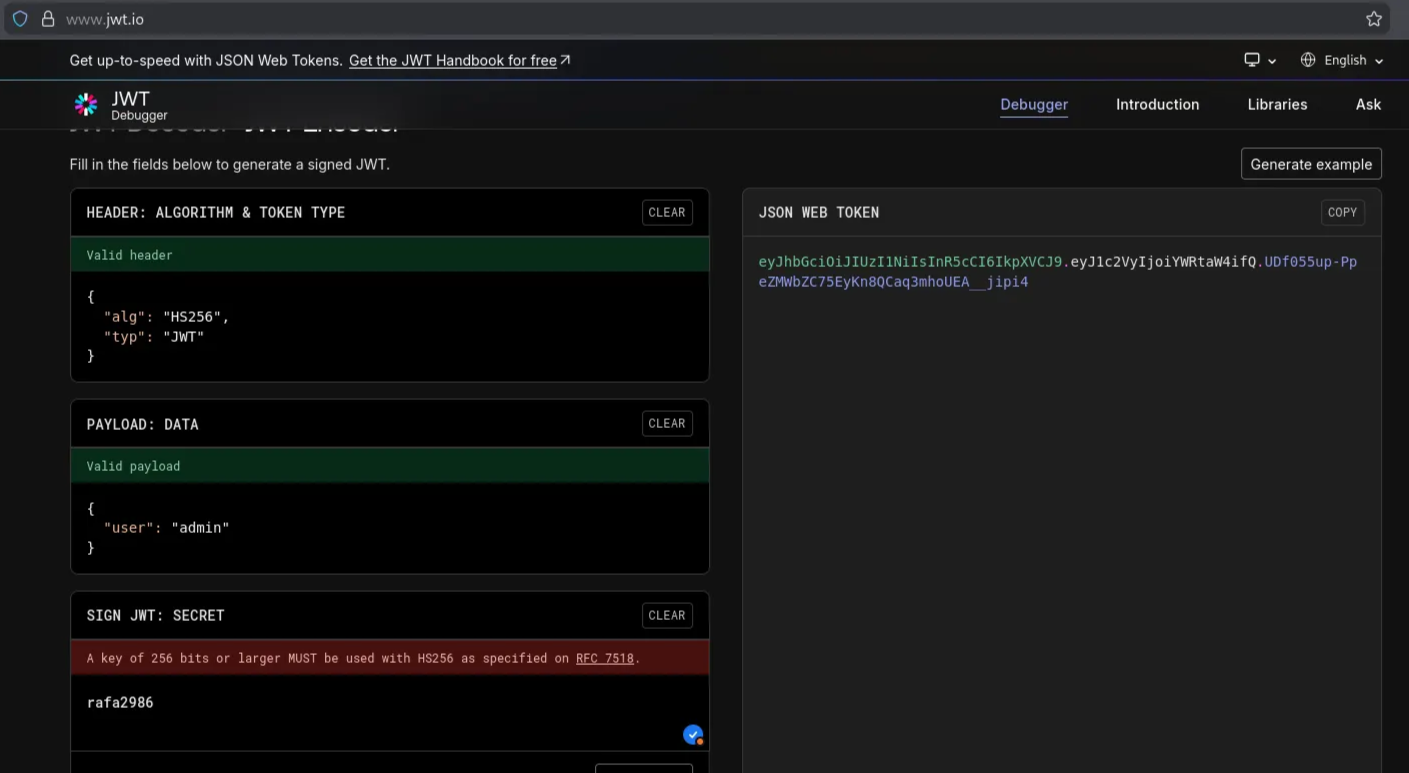
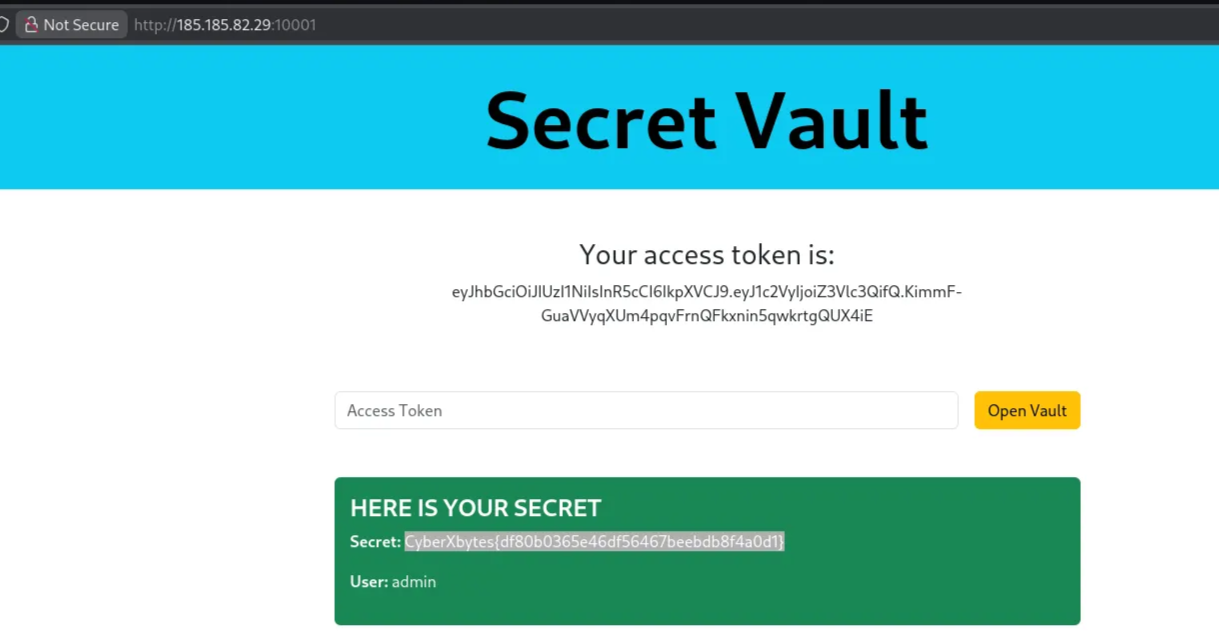
Insert the access token into the input field, and we get the flag
1
eyJhbGciOiJIUzI1NiIsInR5cCI6IkpXVCJ9.eyJ1c2VyIjoiYWRtaW4ifQ.UDf055up-PpeZMWbZC75EyKn8QCaq3mhoUEA__jipi4